
Most coding assessment platforms were built for a world where asynchronous tests were enough. A candidate opened a browser, solved a problem, and submitted code. That worked when talent supply was high and remote hiring was rare.
Today hiring teams need stronger signals. They need to know whether a candidate wrote the code themselves, whether the solution was produced without external help, and whether the process reflects real problem solving ability. This shift has pushed live proctoring from a niche add on to a core assessment requirement.
For HRTech SaaS companies, especially coding test platforms, embedding live proctored video assessments is no longer optional - its a product expectation shared by enterprise buyers, global recruitment teams and assessment partners.
The challenge is that building proctoring from scratch is extremely difficult. It touches video infrastructure, real time data capture, compliance, user experience, AI assisted anomaly tracking, and deep workflow integration. A misstep introduces latency, privacy issues, or candidate experience friction.
This guide breaks down exactly how product and engineering teams can embed live proctored video assessments using a programmable video API such as Clan Meeting. The aim is to give a clear step by step model for adding proctoring to your current test flow without disrupting performance or candidate experience.
Why Coding Test Platforms Need Live Proctoring Now
Three macro shifts explain why live proctoring has become standard -
1. Remote hiring is now dominant
A 2024 Gartner Talent Survey found that more than 70% of global organisations have adopted remote or hybrid hiring as a permanent model. This means assessments must verify identity, environment, and behaviour without relying on controlled test centres.
2. AI powered cheating has changed the risk profile
With generative AI tools available on every device, coding assessment integrity is harder to preserve. Recent studies from CodeSignal and HackerRank show that uncontrolled assessments experience a significant rise in AI assisted submissions, especially in entry and mid-level roles.
3. Employers want higher confidence signals
Companies do not want to filter thousands of resumes and then run unreliable tests - they want a consistent, defensible assessment process that reduces false positives. Live proctoring builds confidence by giving hiring teams real time visibility into candidate behaviour while preserving fairness.
What a Live Proctored Coding Assessment Actually Requires
A complete live proctored system requires more than a webcam feed. At minimum, the platform must enable -
- High quality real time video of the candidate
- Multi stream capture of face, screen, and audio
- Identity verification before test start
- Continuous environment monitoring
- Automatic detection of suspicious behaviour
- Live proctor control panel
- Secure recording for audit and review
- Low latency transport to avoid candidate lag
- Compliance with regional privacy regulations
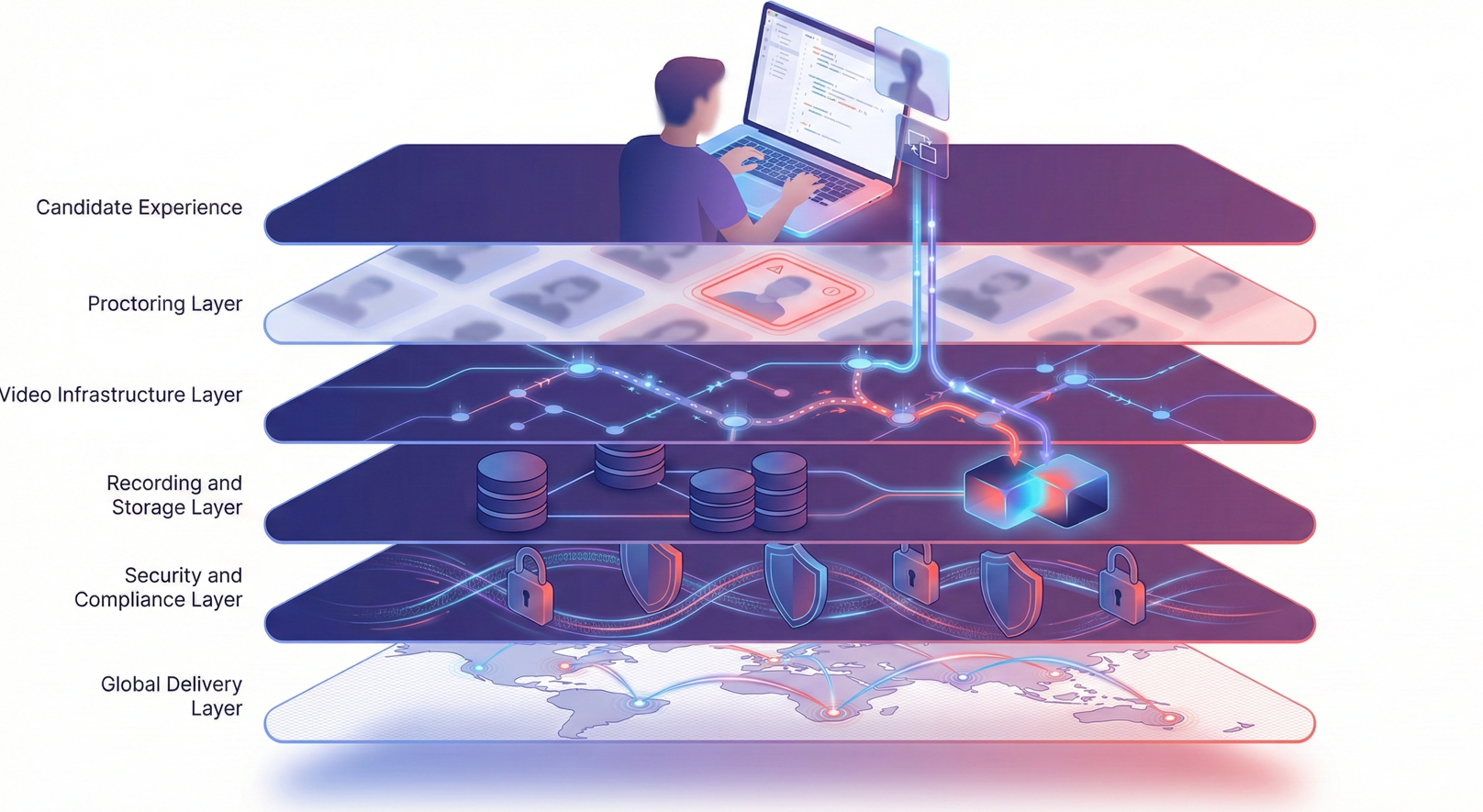
Live Proctored Video Infra Layer
This is why engineering teams rarely build this from scratch.
A programmable video API speeds up the implementation process while ensuring a consistent performance.
Clan Meeting, for example, handles low latency routing, adaptive bitrate, multi stream capture, and recording at infrastructure level so the product team can focus on the workflow.
Step by Step: How to Add Live Proctored Video Assessments to a Coding Test Platform
The following sequence reflects how leading HRTech SaaS teams approach integration. It is optimised to minimise engineering time and ensure a seamless candidate experience.
Step 1: Make a map of the assessment flow and find the proctoring touchpoints
Your team needs to figure out where proctoring fits into the assessment process before adding video. Most coding test platforms have a standard workflow -
- Invite the candidate
- Have the candidate log in and set up their surroundings
- Starting the test window
- Setting up the code editor and IDE environment
- Making reports for recruiters
It is important to link live proctoring to this workflow in a way that makes sense to the users.
- At login, live video to validate your identification
- Before the test examine the environment and get authorization
- Monitoring of video and screens in real time during the test
- Session recordings are kept for review and audit
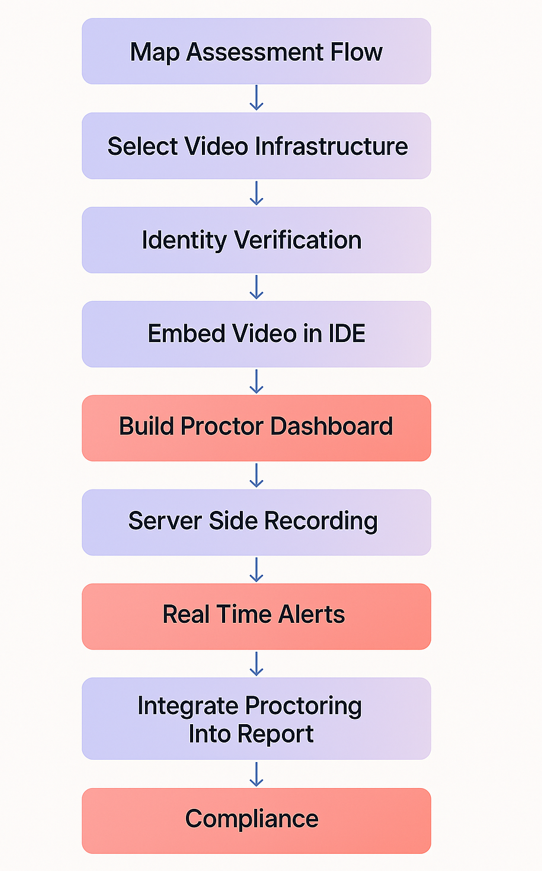
Steps to Add a Live Proctored Video Assessment
Step 2: Select a Video Infrastructure Designed for Low Latency and Multi Stream Capture
Most generic video platforms are not built for proctored assessment use cases. Coding tests require -
- Less than 200 ms latency for real time monitoring
- Ability to stream candidate face and screen simultaneously
- Recording of both streams with synchronised timestamps
- Network quality adaptation for low bandwidth regions
- Secure data channels for event logging
A usage based video API such as Clan Meeting provides exactly these primitives.
Instead of building WebRTC pipelines, TURN servers, relay routing, and compositing logic, you use pre built components -
- Video room with adaptive quality
- Multi track capture API
- Server side recording
- Screen share streams
- Real time events such as tab switch or background noise
This reduces integration time from months to days.
Step 3: Implement Identity Verification Using a Short Live Video Check
Enterprise customers expect validation that the candidate who logs in is the person expected. The simplest approach is a 20 to 30 second live video capture that compares the image to the ID uploaded earlier.
A typical workflow looks like this -
- On test start, open a small live preview using the video API
- Ask the candidate to look straight, left, and right
- Capture a few frames
- Run a light face match or store for manual verification
This single step reduces impersonation risk significantly. It also trains the candidate to allow camera access thus reducing friction later.
Step 4: Add an Automated Environment Scan
Before launching the coding test, platforms increasingly require a short environment scan. This can include -
- A 360 degree room scan using webcam movement
- Microphone test for background conversation
- Lighting quality check
- Single person presence detection
A video API cannot detect whether another person is behind the camera, but it can provide high quality stream frames for your own ML models or third party tools.
Most platforms implement a 10 second guided flow. The aim is not to penalise candidates but to establish a baseline of the environment before the assessment begins.

Step 5: Embed the Live Video Stream Inside the Coding Environment
This is the heart of the experience.
The candidate should see a small floating or docked video tile in the corner of the code editor. The tile should not obstruct the IDE, should auto scale on smaller screens, and should survive refresh events.
From an engineering standpoint, this involves -
- Calling the video API to create or join a room
- Publishing the candidate camera stream
- Publishing the candidate screen stream
- Rendering both streams inside your custom UI
Clan Meeting provides UI components that can be themed and embedded directly or you can build your own interface using the underlying SDKs.
The candidate should feel that this is part of the test and not a separate application.
Step 6: Set Up the Proctor Dashboard for Real Time Monitoring
Live proctoring requires a control centre where proctors can watch multiple candidates at once. The dashboard must support -
- Grid view of all candidates
- Single candidate focus view
- Live alerts such as face out of frame, extended silence, or multiple people
- Two way communication for proctor intervention
- Ability to pause or terminate the test
- Event log with timestamps
Without this dashboard, the video feed is not actionable.
Most platforms implement this as a separate interface which is authenticated only for authorised proctors. Using an API based approach, a proctor can join the same room in observer mode where he is invisible and muted while receiving all video and screen streams.
Step 7: Enable Automatic and Server Side Recording
Recording is essential for compliance and dispute resolution and it also allows hiring managers to review behaviour asynchronously. A complete recording system must -
- Capture face and screen streams
- Time sync both tracks
- Store them securely
- Encrypt at rest
- Provide playback controls
- Support retention policies
Server side recording simplifies the workflow. Instead of relying on unpredictable client side uploads, the recording is composed, stored, and made available through a secure API. Clan Meeting provides this as an infrastructure layer, removing the operational complexity entirely.
Step 8: Trigger Proctoring Events and Alerts During the Assessment
A proctoring system is significantly more valuable when it augments human observation with automated anomaly detection. Example signals include -
- Face moving out of frame
- Multiple faces detected
- Excessive background sound
- Multiple screen applications detected
- Tab switching
- Dirty screen share (blur, blocked view, or paused feed)
- Unusually long idle time
These events should be passed to your backend in real time and displayed in the proctor dashboard.
Advanced teams also store these events in a structured log that HR can review later. Even if you do not plan to use AI today, collecting clean event data now will enable future ML based proctoring models.
Step 9: Integrate Proctoring Results Into the Final Assessment Report
Recruiters today do not want fragmented tools for different parts of the process . Therefore, your assessment report should include -
- Proctoring summary score
- Key alerts with timestamps
- Relevant screenshots
- Links to video recordings
- Environment scan summary
- Identity verification result
Recruiters want to know whether the coding result was obtained in a fair and controlled way and the platforms that is able to do that in a most seamless way, wins the trust of these enterprises leading to better deal conversions.
Step 10: Ensure Compliance, Data Retention, and Candidate Privacy
Live proctoring introduces sensitive data and hence, the implementation must satisfy the following things -
- GDPR and regional privacy laws
- Clear candidate consent
- Secure storage of recordings
- Retention periods that honour customer policies
- Ability to delete data on request
- Strict access controls for proctors
Most customers, especially in Europe and the United States, actively evaluate vendor compliance as part of procurement and hence to ensure that your solution is following these standards becomes super important.
Common Mistakes to Avoid
Live proctoring breaks down mainly from overlooking fundamentals rather than missing advanced features. These are the issues that repeatedly hurt trust and lead to failed rollouts.
Excessive latency
Even a well-designed proctoring workflow becomes ineffective if the underlying video stream is unstable. When latency rises beyond 200 ms, proctors cannot evaluate behaviour accurately because the feed does not reflect what is happening in the moment. This is usually a symptom of generic video infrastructure that was never optimised for real time monitoring.
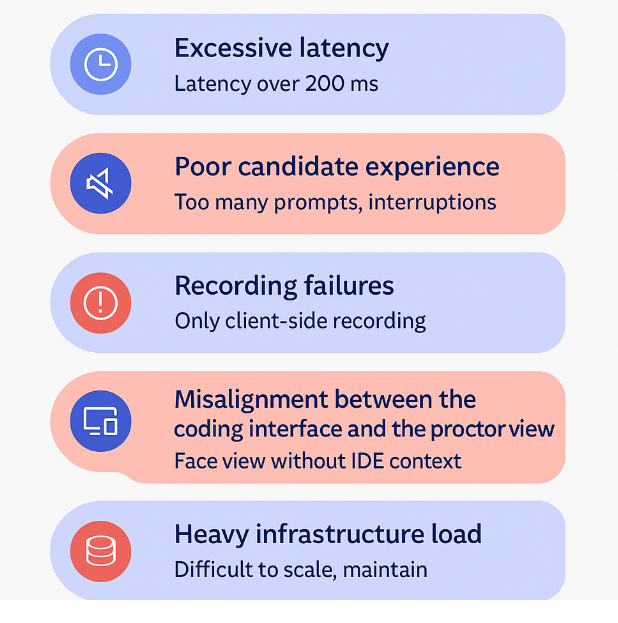
Mistakes to Avoid While Integrating Live Proctoring
Poor candidate experience
Many platforms treat proctoring as a technical add on and forget that it introduces more friction than a standard coding test. Typical failure patterns include -
- Repeated permission prompts that interrupt the test
- Camera or microphone restarts that break concentration
- Pop ups that take over the screen at the wrong moment
These do not just frustrate candidates, they directly increase abandonment rate and support tickets.
Recording failures
A single missing recording can invalidate an entire assessment. Client side recording is the most common cause of this because it depends on browser stability, device performance, and local upload quality.
A robust proctoring system requires -
- Server side recording
- Composited streams (face plus screen)
- Guaranteed retention even on low bandwidth networks
Without this, the audit trails become unreliable.
Misalignment between the coding interface and the proctor view
Proctors need context and therefore, when the dashboard shows the candidate’s face but not the screen, or alerts are not tied to what the user was doing in the IDE, the review becomes incomplete.
Platforms that solve this align -
- Face stream
- Screen stream
- Event timeline
- Code editor activity
This combination makes proctoring meaningful rather than cosmetic.
Heavy infrastructure load
Teams often underestimate the operational complexity behind low latency video. Running relays, scaling TURN servers, managing global routing, and handling media pipelines is expensive and distracts from product development.
This is why most assessment platforms eventually shift to a programmable video API that provides -
- Low latency streaming
- Multi stream capture
- Scalable global routing
- Automatic recording
- Operational reliability
It removes the ongoing maintenance burden and lets engineering teams build better assessment logic.
Final Thoughts: Proctoring Is Now a Core Capability, Not a Feature Add On
Coding assessment buyers are much more sophisticated than earlier and they evaluate not just the quality of questions but the integrity of the process.
Adding live proctoring is one of the fastest ways to increase credibility, win enterprise deals, and expand into global markets where remote hiring has become standard as the advantage goes beyond fraud detection. Proctoring provides structured behavioural signals, higher confidence scoring, and a more transparent hiring process.
The fastest route for most HRTech SaaS teams is to integrate a specialised video API such as Clan Meeting that ensures low latency, multi stream capture, secure recording, and complete customisability, while allowing teams to publish a polished experience in weeks rather than quarters.
If your platform is preparing to move up market, proctoring is not optional. It is the new baseline.
Frequently Asked Questions
1. What is a live proctored coding assessment?
A live proctored coding assessment is an online coding test where a candidate’s face, screen, audio, and environment are monitored in real time through a secure video system. It helps employers verify identity, prevent cheating, and ensure that the submitted solution reflects the candidate’s actual skills.
2. Why should coding test platforms add live proctoring?
Demand for proctored assessments has increased because remote hiring is now the default in many organisations. Live proctoring improves test integrity, reduces AI assisted cheating, and gives recruiters reliable behavioural signals. Platforms that offer proctoring win more enterprise deals because they provide higher confidence in the results.
3. What infrastructure is required to add a live proctoring system?
A complete proctoring setup requires low latency video, multi stream capture (face and screen), server side recording, global routing, secure storage, and a proctor dashboard for monitoring. Building this from scratch is complex, which is why many platforms use a programmable video API such as Clan Meeting to manage the video layer.
4. How does identity verification work in a proctored coding assessment?
Identity verification typically involves a short live video check where the candidate looks into the camera for a few seconds. The captured frames are compared to the candidate’s ID or stored user profile. This prevents impersonation and protects the integrity of the assessment process.
5. How does live proctoring improve the accuracy of coding assessments?
Live proctoring captures both behaviour and screen activity, so recruiters can review how the candidate approached the problem, not just the final code output. Alerts such as tab switching, face out of frame, multiple people detected, or long idle periods provide additional context that strengthens the credibility of the assessment.
6. Is server side recording necessary for proctored assessments?
Yes. Client side recording often fails due to network issues, browser crashes, or device limitations. Server side recording guarantees that both face and screen streams are captured, time synchronised, encrypted, and stored reliably. This ensures compliance and provides a defensible audit trail for enterprises.