
If you go back a decade, most SaaS products that needed real time communication did not debate between a teleconference API and a video conferencing API. The choice was largely made for them.
Audio was reliable, cheaper, and widely supported while video was heavy and often outside the core product experience.
That context matters because many of today’s product decisions are still influenced by assumptions that were true then but are increasingly outdated now.
So, when teams ask whether they should use a teleconference API or a video conferencing API, the answer is rarely about audio versus video alone. It is about how communication fits into the product and what kind of interaction the product is implicitly promising.
Understanding What a Teleconference API Solves Well
A teleconference API is designed around a simple and focused goal - allow multiple participants to speak to each other reliably, regardless of device or network quality.
Most teleconference APIs evolved from enterprise voice infrastructure. They assume that -
- users may dial in from phones
- network quality will be inconsistent
- sessions may involve many participants
- the interaction itself is functional rather than expressive
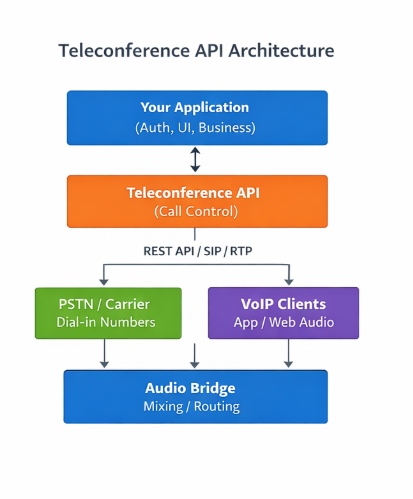
Teleconference API Architecture
Because of this, teleconference APIs rely on centralized audio bridges, speech optimized codecs and often PSTN or SIP connectivity. The system does not try to infer intent or context but simply ensures that voices get through.
This design has real advantages as even when bandwidth drops or packets are lost, audio conversations remain usable. That reliability is why teleconference APIs continue to be widely used in support workflows, internal coordination calls, and large scale audio events.
In these cases, adding video does not improve the outcome - it only increases complexity.
What Changes When Video Enters the Equation
A video conferencing API starts from a very different premise as it assumes that seeing the other person changes the interaction itself.
Once video is introduced, the system is no longer just transporting audio but is considered synonymous to physical presence with facial cues, eye contact, posture and screen context all become part of the communication. This is why video conferencing APIs tend to include much more than video streams and usually support screen sharing, recording, in session controls, and UI components that live directly inside the product.
Under the hood, this requires more adaptive infrastructure.
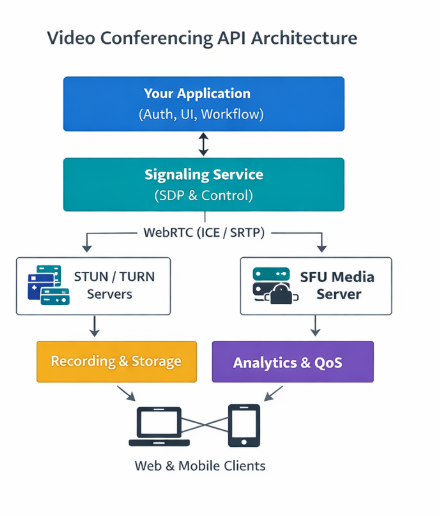
Video Conference API Architecture
Most modern video conferencing APIs are built on WebRTC and use SFU based routing so that each participant receives an optimized stream rather than a single mixed feed. The system continuously adjusts bitrate and resolution based on real time network conditions.
That complexity exists because the API is not just optimizing for minimal delivery but is optimizing for experience consistency across a wide range of environments.
Why Feature Comparisons Miss the Real Difference
It is tempting to compare teleconference APIs and video conferencing APIs using feature tables - audio versus video, dial in support vs recording, participant limits etc. but, those comparisons can often be misleading because the real difference is not so much in features but in how users behave during the session.
Audio only calls tend to be efficient and transactional - people join, speak, and leave but attention very often drifts in these calls easily because there is little accountability or visual feedback.
On other hand, in video calls participants are more likely to stay engaged and complete the intended task not because video is novel but because humans are wired to respond to visual presence.
This distinction becomes critical in workflows like interviews, onboarding, education, or assessments where attention and trust directly affect outcomes.

Infrastructure Trade-offs and Long Term Consequences
From an engineering perspective, teleconference APIs are attractive because they are predictable and lightweight, scaling costs are linear and failure modes are often well understood.
Video conferencing APIs on other hand introduces more variables - encoding, routing, recording, and playback all add complexity. Any poor architectural decisions can lead to latency or degraded quality in the call which in turn can lead to a bad user experience.
However things have changed over the last few years.
Modern video conferencing APIs have made it possible to add video without building a media stack from scratch. The hard problems still exist but they are no longer the product team’s day to day concern. What matters more now is how video is used, where it shows up in the workflow, and whether it actually improves the experience for the person on the other side of the call.
| Teleconference API (Audio) | Video Conferencing API |
Primary focus | Reliable audio communication | Rich, real time interaction |
Typical use | Short, functional calls | Interviews, learning, evaluations |
User experience | Transactional | Presence driven |
Bandwidth needs | Very low | Adaptive, but higher than audio |
Integration complexity | Simple and predictable | More complex, now largely abstracted |
Role in product | Supports the workflow | Often defines the workflow |
Bandwidth Reality and Global Users
One of the strongest arguments in favour of teleconference APIs is bandwidth tolerance. Audio works almost everywhere and that matters a lot, especially for global products. Video conferencing, on the other hand, has traditionally struggled in low bandwidth conditions which is why many teams hesitate to adopt it for users outside well connected regions.
Having said that, most of the new age video conferencing APIs are built to operate in such conditions and are designed to adjust continuously to provide optimal performance.
When bandwidth drops, video quality steps down first, frame rates reduce, and audio is prioritized so the conversation can continue. In practice, this means users do not experience a complete failure but a gradual change in quality.
The difference here is quote subtle but important.
Teleconference APIs assume constrained networks as the default while video conferencing APIs assume variability and try to adapt in real time. For products serving users across geographies, that ability to adapt often matters more than raw bandwidth requirements.
Cost Is Often Misunderstood
Teleconference APIs are usually much cheaper on a per-minute basis, have less costs less to run, scales predictably and has fewer variables to manage.
However, what often gets overlooked is the value of the interaction being supported.
When a call exists purely to resolve an operational issue or exchange information quickly, audio is both efficient and cost-effective. In contrast, when a session influences a hiring decision, a learning outcome, or a revenue-driving conversation, the economics change. In those cases, the marginal cost of video is small compared to the risk of disengagement, miscommunication, or poor judgment caused by lack of context.
This is why many SaaS products are willing to absorb higher infrastructure costs for video and still see stronger unit economics overall.
Experience And Identity Of The Product
Another difference that only becomes clear over time is how each API affects how the product works.
When you use teleconferencing APIs, it frequently feels like the interaction is outside of the product - people call in, leave the interface, and come back after the call is over.
Video conferencing APIs, on the other hand, are designed to live inside the product itself.
The interface can be branded, sessions can begin and end without breaking context and information generated during the call can flow directly into workflows and analytics. Over time, this makes communication feel less like a separate tool and more like a native part of the product experience.
For SaaS products, this changes how communication is perceived and gradually, video becomes part of the product’s identity rather than a supporting utility.
When a Teleconference API Is Still the Right Choice
Despite the broader shift toward video, teleconference APIs remain the right answer in many scenarios. This is usually the case when the interaction itself is simple and the outcome does not depend on visual context.
Teleconference APIs tend to work well when -
- the interaction is short and mostly functional
- visual cues don't have a big impact on the outcome
- users rely more on phone access rather than browsers
- infrastructure simplicity and predictability are a priority
Adding video in these kinds of scenarios often makes things harder without making the user experience or results any better.
Scenario | Teleconference API is a better fit | Video Conferencing API is a better fit |
Nature of interaction | Quick, operational, information exchange | High intent, outcome driven conversations |
Importance of visual context | Low or irrelevant | High and materially impacts outcomes |
User devices | Phone first or mixed device environments | Browser or app based experiences |
Engagement requirements | Minimal engagement needed | Sustained attention and participation required |
Role of communication | Supporting the workflow | Central to the workflow |
Risk of miscommunication | Low impact if context is missed | High impact if context is missing |
When You Need a Video Conferencing API
Video conferencing APIs become critical when communication becomes the core part of product’s value rather than just a feature. In these cases, the quality of the interaction directly influences outcomes, and audio alone often leaves too much context on the table.
This is especially true when -
- trust and identity play an important role in the interaction
- sessions involve evaluation, assessment, or learning
- user engagement has a direct impact on results
- communication is embedded within broader product workflows
In situations like these, video functions as a foundational layer that supports how the product delivers value and becomes critical.

A Better Way to Frame the Decision
Instead of starting with the question of whether to use a teleconference API or a video conferencing API, it helps to step back and look at how communication actually functions inside your product.
In most cases, the more useful distinction is whether communication is simply supporting the workflow or whether it is shaping the workflow itself. When communication plays a supporting role, audio is often enough. It allows users to coordinate, clarify details, or resolve issues without pulling focus away from the primary task.
However, the equation changes when communication becomes part of the product experience rather than a layer around it. If the interaction itself influences outcomes, such as in interviews, evaluations, onboarding, or learning, then context starts to matter and at that point, video usually shifts from being an optional enhancement to something more structural because it affects how users engage and make decisions.
Looking at the decision through this lens helps teams avoid optimizing too early for cost or implementation speed. Instead, it encourages a clearer conversation about what role communication is expected to play as the product evolves.
Final Thoughts
People typically talk about the distinction between a teleconference API and a video conferencing API in terms of audio and video but that's not what actually matters when making a choice.
Teleconference APIs are designed to deliver reliable and efficient communication with as little overhead as possible while video conferencing APIs are built for situations where presence, engagement, and visual context influence how people interact and what they take away from the session.
Both the approaches serves different set of needs and both continue to be relevant when applied in a right way. The right choice often then depends on how much context your users need to succeed and how important communication is to the value your product delivers.
Frequently Asked Questions
1. What is a teleconference API?
A teleconference API is typically used to enable audio-only conferencing inside an application. While teleconferencing technically includes both audio and video, the term teleconference API is most often used today to refer to voice-based conferencing infrastructure that supports phone dial-in, VoIP audio, and centralized audio bridges.
2. How is a teleconference API different from a video conferencing API?
The primary difference lies in intent rather than just media type. Teleconference APIs are optimized for reliable, low-bandwidth audio communication, while video conferencing APIs are built to support richer interactions that include video, screen sharing, and embedded workflows where visual context affects outcomes.
3. When should a product use a teleconference API instead of video?
A teleconference API is usually a better fit when communication plays a supporting role in the product, such as quick operational calls, coordination, or support scenarios. In these cases, audio is sufficient, bandwidth requirements are minimal, and adding video does not meaningfully improve the user experience.
4. When does a video conferencing API become necessary?
A video conferencing API becomes important when communication defines the workflow itself. This includes use cases like interviews, onboarding, education, assessments, and evaluations, where trust, engagement, and visual cues influence decisions and outcomes.
5. Are video conferencing APIs suitable for low-bandwidth or global users?
Modern video conferencing APIs are designed to operate across variable network conditions. They dynamically adjust video quality and prioritize audio when bandwidth drops, allowing sessions to continue even in less reliable environments. While audio-only conferencing remains more tolerant, well-built video APIs can still perform reliably for global users.
6. Why do Google results for “teleconference API” often show video conferencing platforms?
Search behaviour has shifted over time. Many users now use the term teleconference to mean online meetings in general, which are largely video-based today. As a result, Google surfaces video conferencing API pages because they better match current user intent, even when the query mentions teleconference.